crewswarm is an open-source, local-first AI workspace combining a multi-agent orchestration runtime, a browser control-plane dashboard, the Vibe browser IDE, and native chat clients. It allows software engineers to dispatch complex tasks to specialist AI agents running securely in Docker containers on their own hardware using the ATAT protocol.
Stinki — crewswarm mascot

One idea.
One build.
One crew.

The only multi-agent AI coding platform. Switch between Claude Code, Cursor, Gemini, Codex, and OpenCode mid-conversation. Parallel agents. Persistent sessions. No vendor lock-in.

The mental model is different: you are the PM, the agents are your engineers. Keep multiple workers moving in parallel, unblock them, and ship faster than one person hand-typing everything.

6 CLI engines Native session resume Dashboard + Vibe IDE 20+ specialist agents Wave orchestration PM-led builds Local-first & open source
Install crewswarm GitHub npm Explore Vibe PM Loop Walkthrough Compare Engines
npm install -g crewswarm copy
Free forever. Open source. Bring your own API keys or use CLI OAuth.
Works with OpenAI| Anthropic| Google| Groq| xAI| DeepSeek| Ollama| Cursor| Codex| +15 more
pm-loop — crewswarm
$
How a build works

From idea to shipping in five steps

Every crewswarm build follows the same flow. Type a requirement, watch the crew work, ship.

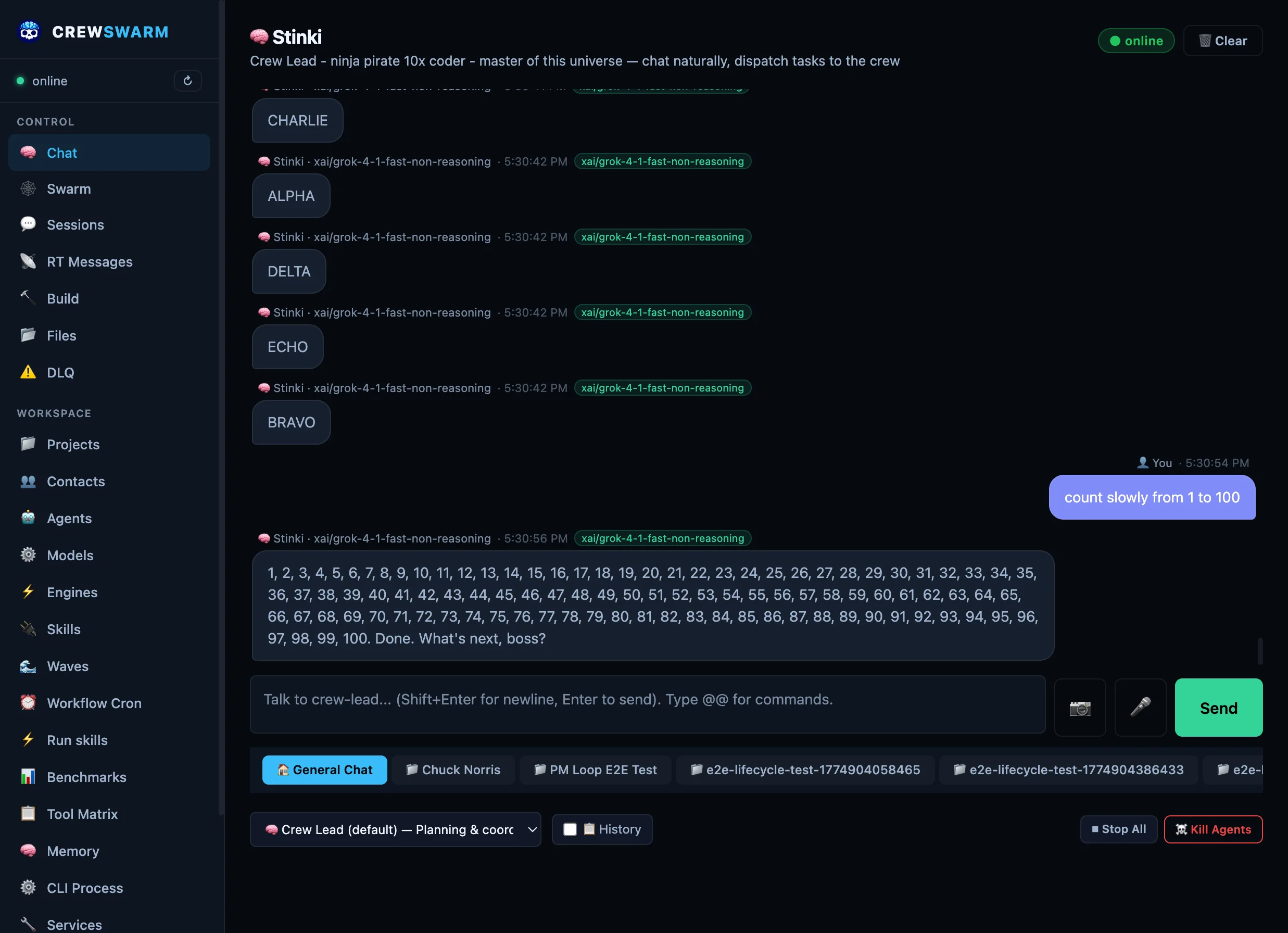
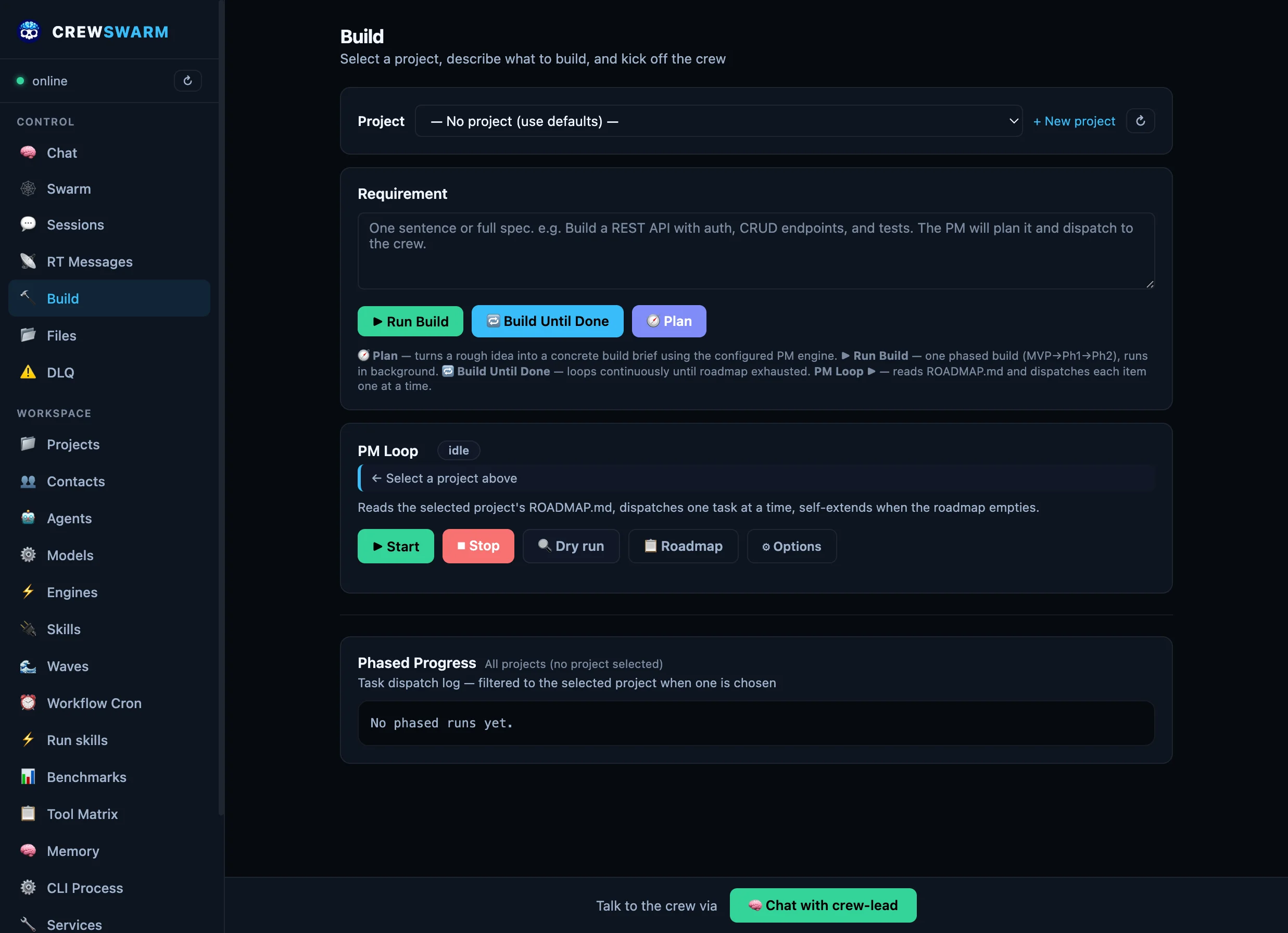
Dashboard build view — type your requirement

Type your requirement

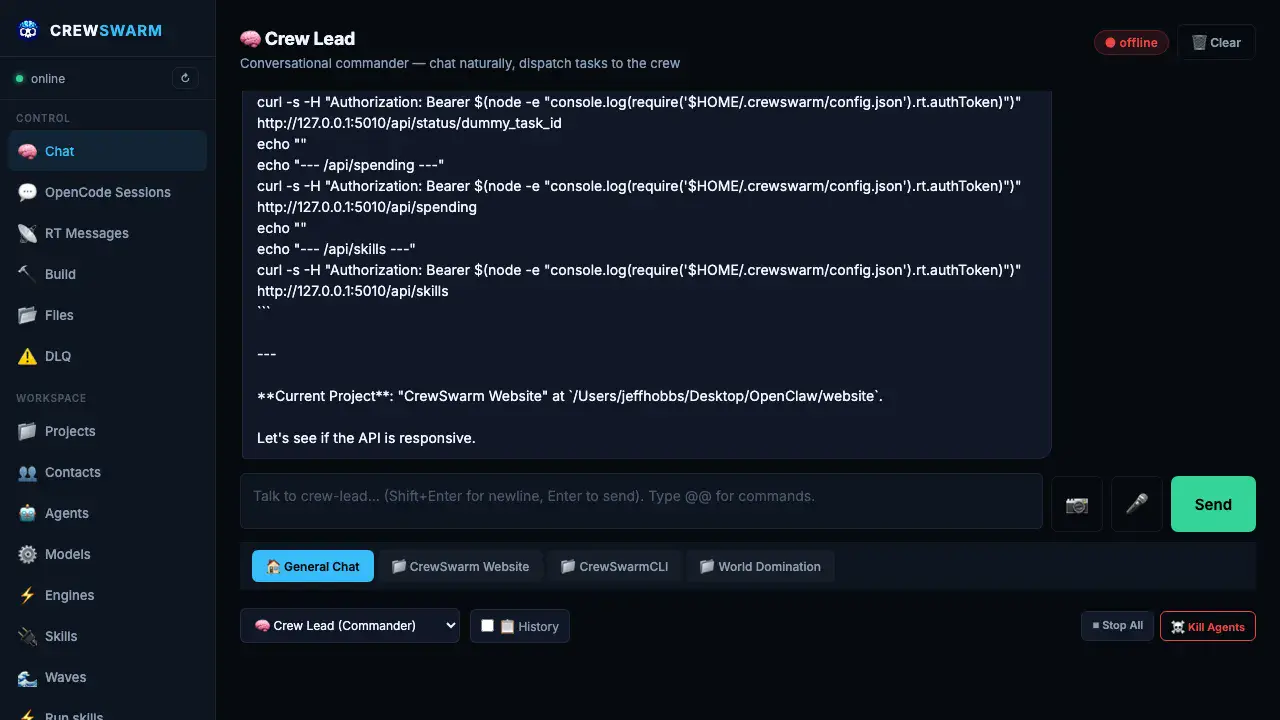
Dashboard chat view — crew-lead plans and dispatches work

crew-lead plans and dispatches

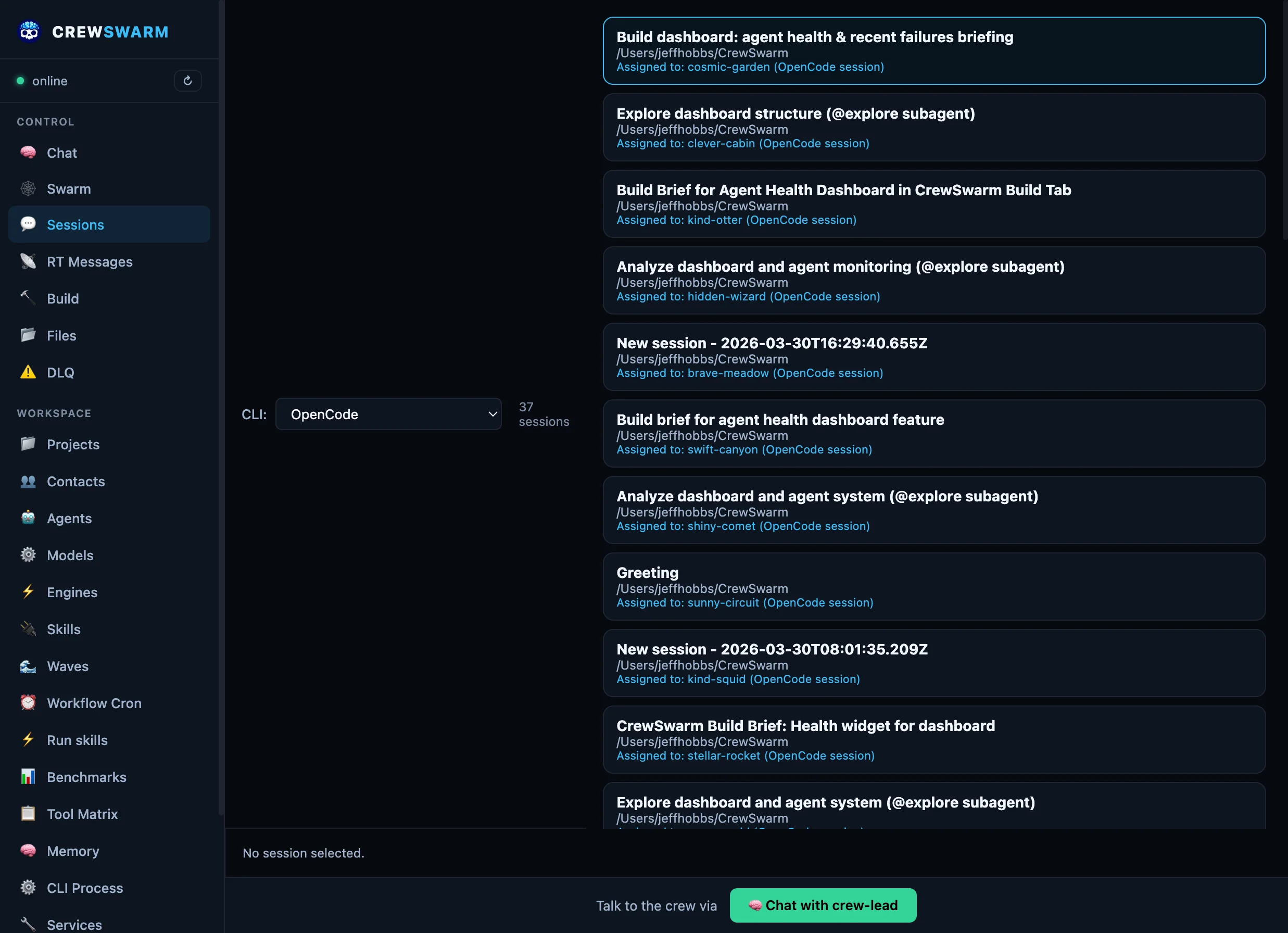
Dashboard swarm view — agents working in parallel

Agents work in parallel

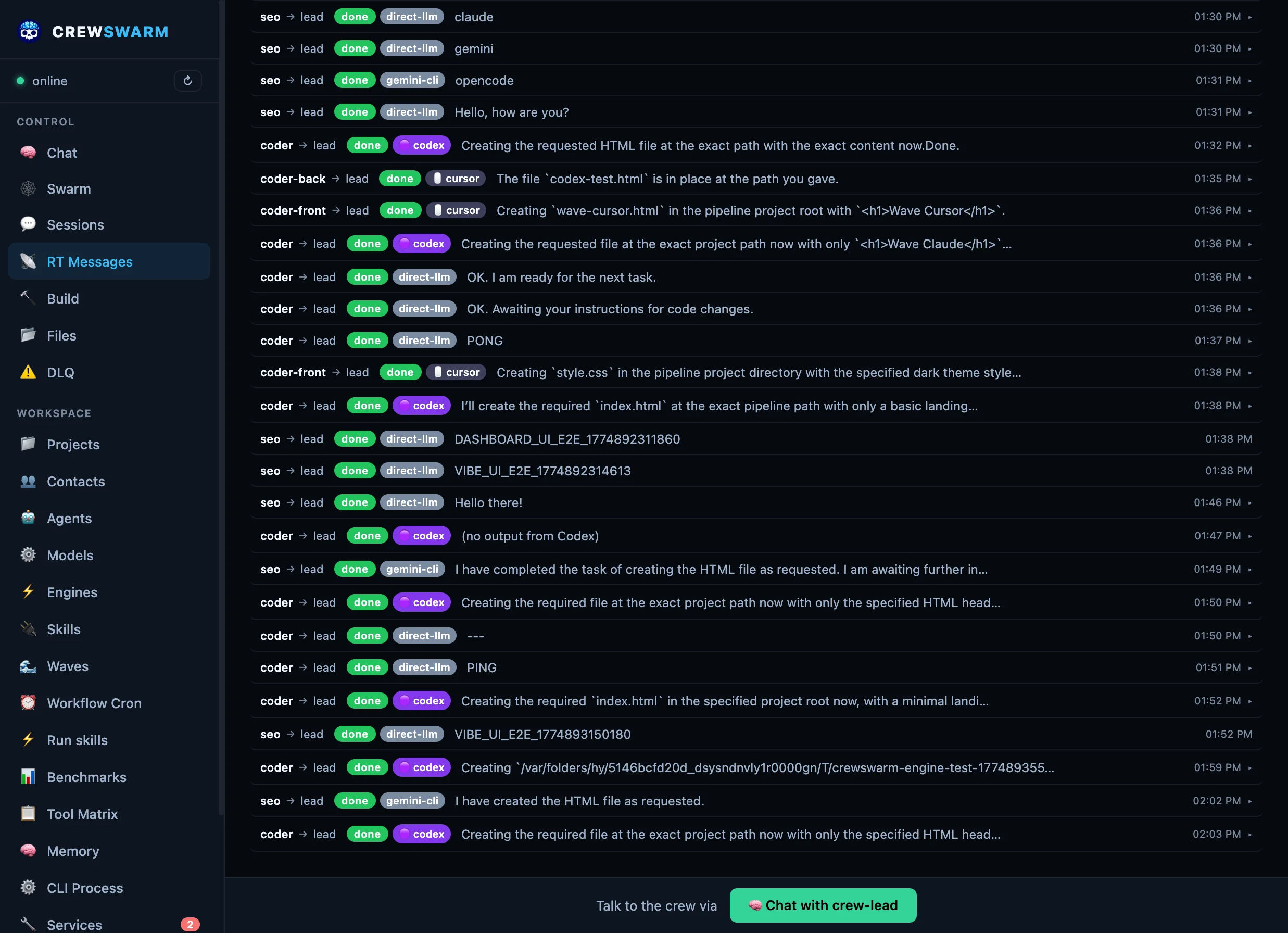
Dashboard real-time messages — watch build progress live

Watch real-time progress

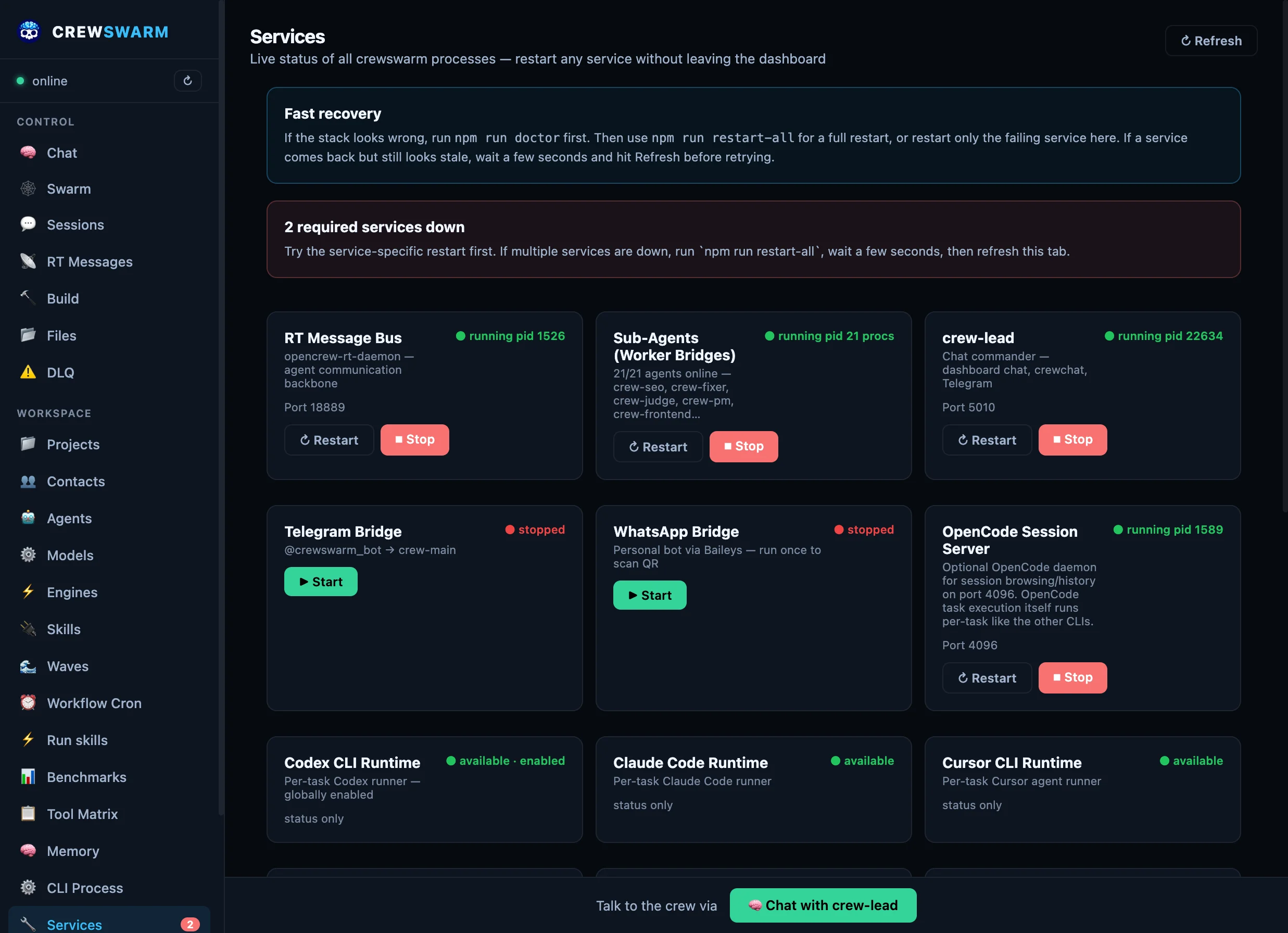
Dashboard services view — everything stays healthy

Everything stays healthy

Operating Model

You are the PM. The agents are the engineers.

Single-agent tools still assume one human driving one model. crewswarm is built for a different workflow: define the goal, split the work, run multiple specialists in parallel, and spend your time unblocking and reviewing instead of waiting for one agent to finish.

Parallel by default

Frontend, backend, QA, PM, and security lanes can all move at once. Idle time should start another worker, not watch one agent type.

Delegate, don’t babysit

Assign concrete tasks, constraints, and acceptance criteria. The system routes work to the right agent and engine instead of forcing one model to do everything sequentially.

Keep the crew unblocked

The human job moves up a layer: approve direction, resolve blockers, review outputs, and redirect effort. That is the PM loop.

Read the PM Loop manifesto · See a concrete PM-loop run · Compare the execution lanes

Most AI dev tools are just a chat box bolted onto an editor.

crewswarm is different. It is built to handle actual execution. While other tools fake the important parts, our specialist agents write real files, execute commands locally, and maintain persistent project memory across multiple steps without disappearing into someone else's cloud.

The Product

One stack. Three surfaces.

Use the Dashboard as the control plane, Vibe as the browser IDE, and crewchat as the native chat client. All three talk to the same agents, memory, and runtime.

Dashboard Services, agents, models, memory, and build control.
Vibe File tree, Monaco editor, chat, diffs, and terminal.
crewchat Native chat surface for quick routing and project context.
vibe.html
Real Vibe browser IDE screenshot with file explorer, editor workspace, agent chat, and activity trace
How it works

From requirement to reality
in one command

No orchestration expertise required. Write what you need in plain English.

01

You write a requirement

One sentence, one paragraph, or a full spec. Drop it in the dashboard or pass it on the CLI.

02

PM breaks it into tasks

crew-pm plans MVP → Phase 1 → Phase 2. Each phase gets 3–5 small, targeted tasks.

03

Agents execute with real tools

crew-coder writes code, crew-qa adds tests, crew-fixer handles bugs — each gets exactly their task.

04

Done. Files on disk.

Real files, real output. No hallucinated success messages. Failed tasks hit the DLQ for replay.

Quickstart

Install to first build in 60 seconds

One npm install. Pick your models. Ship a feature. That's it.

Architecture

6 engines, 22 agents, one RT bus

crewswarm runs as one stack: 6 coding engines for execution, a realtime bus for agent coordination, and surfaces (dashboard, Vibe, crew-cli, Telegram, WhatsApp) on top.

Planning crew-pm · roadmap → phased tasks
command · assign
crew-coder
crew-coder-front
crew-coder-back
crew-qa
crew-fixer
crew-security
done · status
Coordination crew-lead · route, synthesize, reply

RT bus channels (command, assign, done, status, events) coordinate 22 agents across 6 coding engines.

Three layers, one stack

The product stays simple because the runtime is layered cleanly underneath it.

01

Execution engines

Claude Code · Cursor CLI · Codex CLI · Gemini CLI · OpenCode · crew-cli

Six coding engines that write files, run commands, and stream output across all 22 providers. Each agent can use a different engine. Switch from the dashboard.

02

RT bus + agent bridges

WebSocket bus · targeted dispatch · retries · DLQ · wave orchestration

22 agent bridges connect via WebSocket. Targeted dispatch sends tasks to specific agents. Failed tasks retry with backoff, then hit the Dead Letter Queue.

03

Product surfaces

Dashboard · Vibe IDE · crew-cli · Telegram · WhatsApp · MCP

PM Loop, shared memory, wave orchestration, session resume, and fault recovery — accessible from any surface. Same agents, same RT bus, different interfaces.

Rate limits are real

Hit a limit? Switch engines. Keep building.

Every $20/month plan has rate limits. Claude, Cursor, Codex — you'll hit the wall mid-feature. crewswarm is the only tool where you seamlessly switch to another engine and keep your session context. Or pick the best CLI for each job.

🤖

Claude Code

Best for large refactors, multi-file reasoning, and frontend work. Full workspace context means it sees everything. Native session resume across messages.

Best for: crew-coder, crew-fixer, frontend
🖱

Cursor CLI

Best for architectural decisions and complex reasoning. Isolated context windows prevent cross-agent bleed. Parallel waves with zero queuing.

Best for: crew-architect, crew-orchestrator

Gemini CLI

Free tier: 60 req/min, 1,000 req/day. 1M token context window. Built-in Google Search grounding for research-heavy tasks, SEO work, and web-connected coding.

Best for: research, SEO, free-tier fallback
🟣

Codex CLI

Fast agentic coding with full sandbox access. No approval prompts — just executes. Built for OpenAI models with MCP integration. Great for backend and API work.

Best for: crew-coder-back, fast iteration

OpenCode

Works with any model provider — Groq, DeepSeek, Ollama, anything. Persistent sessions survive between tasks. The provider-flexible workhorse for long coding sessions.

Best for: provider flexibility, long sessions
🔧

crew-cli

The native engine. Routes to 20+ specialist agents, sandbox workflows with preview-before-apply, parallel worker pool (3x speedup), and LSP self-healing.

Best for: orchestration, quality-gated workflows

You're not locked in. Rate-limited on Claude? Switch to Gemini (free) or Cursor. Need web search? Use Gemini. Need deep reasoning? Use Claude. Mix engines per agent, per task, per mood.

Built different

How crewswarm differs from framework-only stacks

crewswarm is a runtime, not just a library. You get a realtime bus, daemon orchestration, and first-class routing into OpenCode, Cursor CLI, Claude Code, and crew-cli out of the box.

Six execution engines, first-class

Every agent can run inside Claude Code, Cursor CLI, Gemini CLI, Codex CLI, OpenCode, or crew-cli. Switch per agent from the dashboard — no config files, no restarts. Each engine keeps native multi-session resume so context persists across messages and restarts.

Realtime bus + daemons

Agents run as long-lived daemons connected to an RT message bus. Tasks flow over command, assign, done, issues — no in-process-only simulation. Real dispatch, real replies.

Execution layer included

45+ built-in tools (@@WRITE_FILE, @@RUN_CMD, etc.) are executed by the gateway with allowlists and path sandboxing. You don’t have to build a runner or wire a framework to one.

Git worktree isolation

Multi-agent waves automatically get per-agent git worktrees. Parallel agents edit files on isolated branches that merge back after the wave completes. No filesystem conflicts, no manual branch management.

DLQ and fault recovery

Failed tasks go to a Dead Letter Queue with JSONL crash-safe transcripts. Retry with backoff, replay from the dashboard. Framework-only stacks leave retries and observability to you.

Your models, your machine

Each agent calls its LLM directly with your API key. No proxy, no vendor lock-in. Run fully local with Ollama. Compare options in the comparison section.

Why not just Cursor?

Because a single editor is not a runtime

Cursor is an editor. crewswarm is the control plane, runtime, and memory layer around your editors and CLIs.

🧭

Persistent coordination

Agents, services, memory, and projects survive beyond one editor tab or one CLI session.

🛠️

Runtime control

Start, stop, inspect, and route the whole stack from the dashboard instead of gluing scripts together manually.

🔁

Cross-surface continuity

Dashboard, Vibe, crewchat, SwiftBar, and CLI surfaces all talk to the same orchestration layer.

The Ecosystem

One runtime, multiple surfaces.

crewswarm is a modular stack. The core orchestration happens under the hood, but you can interact with the crew through whichever surface fits your current workflow.

🧠

The System (Core Runtime)

The beating heart of crewswarm. It relies on the ATAT WebSocket bus, persistent shared memory, and the PM loop to route your requests to 20+ specialized agents seamlessly.

Vibe IDE

A full-screen, browser-based native IDE. Combines a powerful code editor, file tree, terminal, and agent chat panel into a single unified window. Perfect for starting entirely new projects from scratch.

💻

crew-cli

The terminal-native interface. Use crew exec "build this" right from your project folder to dispatch the crew without ever leaving your terminal or breaking flow.

🎛️

The Dashboard

Your control plane. Manage API keys, assign LLM models to specific agents (like Claude for coding, Groq for fast planning), map local tools, and view the real-time swarm logs.

Features

Everything a dev crew needs,
minus the meetings

PM-led orchestration

Natural-language requirement → PM breaks it into tasks → targeted dispatch to the right agent. No broadcast races. No duplicate work.

crew-pm → crew-coder → crew-qa → crew-fixer
🎯

Targeted dispatch

Send to one agent by name. --send crew-coder "Build auth". Only that agent receives it.

📐

Phased builds (PDD)

MVP → Phase 1 → Phase 2. Failed tasks auto-break into subtasks and retry. No work is lost.

🧩

Domain-Aware Planning

Large codebases (100K+ lines) get subsystem-specific PM agents. crew-pm-cli handles CLI tasks, crew-pm-frontend owns dashboard, crew-pm-core manages orchestration. No more hallucinated file paths.

🧠

Shared Memory + Project Message RAG

Every agent reads shared memory (brain.md, decisions, handoff notes). All project messages auto-save to ~/.crewswarm/project-messages/ and are automatically indexed for semantic search using local TF-IDF + cosine similarity — no API calls, all local.

AgentMemory
  • Cognitive facts (decisions, constraints, preferences)
  • Written by @@BRAIN commands
  • Persists across all sessions
Project Messages
  • All chat saved to JSONL automatically
  • Semantic search: "What did we discuss about auth?"
  • Export to markdown, JSON, CSV
AgentKeeper
  • Task results from completed work
  • Gateway records after execution
  • Available to all future agents
Cache headers prevent stale data. Messages persist across tab switches. Zero configuration needed.
🔌

Skill-powered

Extend agents with data-driven SKILL.md or JSON plugins, plus PreToolUse/PostToolUse hooks for fine-grained control. Add Twitter, Fly.io, or custom API tools without writing JS code.

🎤

Multimodal Support — Images + Voice across all platforms

Send images or voice messages from any surface. Dashboard, Telegram, WhatsApp, and crewchat all support image recognition and voice transcription. Powered by Groq (fast/cheap ~$3/month) or Gemini 2.0 Flash (best quality).

📱 Dashboard Click 📷 to upload images, 🎤 to record voice messages
💬 Telegram/WhatsApp Send photos or voice notes → auto-analyzed and transcribed
🍎 crewchat Native image picker + AVFoundation voice recording
🐦

Real-time X/Twitter Intelligence with Grok

The only AI coding platform with live X/Twitter search. Use @@SKILL grok.x-search to search recent tweets, get citations with X post URLs, filter by date ranges, handles, and media types. Powered by xAI's Grok 3 with real-time X data access.

grok.x-search
  • Search recent tweets (last 24-48 hours)
  • Filter by handles, date ranges, media types
  • Citations with X post URLs
grok.vision
  • Image analysis with grok-vision-beta
  • Screenshot analysis and UI audits
  • Diagram and chart interpretation
Competitive edge: GitHub Copilot can't search X. Claude can't search X. Only crewswarm has real-time X intelligence.
🐳

Docker-First Deployment — Multi-Arch Images

One-line install on any Linux machine. Multi-arch images (AMD64 + ARM64) for servers, VMs, Raspberry Pi, cloud deployments, and CI/CD. Perfect for team shared instances, GitHub Actions, or self-hosted setups.

curl -fsSL https://raw.githubusercontent.com/crewswarm/crewswarm/main/scripts/install-docker.sh | bash
☁️ Cloud VMs
AWS, GCP, DigitalOcean, Azure
🏠 Home Servers
Raspberry Pi 4/5, NUCs, edge devices
🔄 CI/CD
GitHub Actions, GitLab CI, Jenkins
👥 Team Instances
Shared crew for entire team
Local dev setup also available for contributors. Pick the deployment that fits your workflow.
🔄

Fault tolerance

Retry with backoff and task leases. After max retries, tasks hit the Dead Letter Queue for manual replay from the dashboard.

🚀

Six execution engines — your choice per agent

Your crew runs specialist AI agents (PM, coder, QA, fixer…) — each one calling its LLM directly. For heavy coding tasks, agents can go deeper: route them into OpenCode, Cursor CLI, Claude Code, Codex CLI, crew-cli, or Gemini CLI for full file editing, bash access, and persistent sessions. Switch per agent from the dashboard. No restarts, no config files.

OpenCode
  • Persistent sessions per agent
  • Full file editing + bash
  • Context survives across tasks
Best for: crew-coder, crew-fixer, crew-coder-front/back
Cursor Cursor CLI
  • opus-thinking + sonnet-4.6
  • Deep reasoning & architecture
  • Parallel wave dispatch
Best for: crew-main, crew-architect, complex reasoning
Claude Code
  • Full workspace context
  • Native Anthropic tool use
  • Session continuity per agent
Best for: large refactors, multi-file reasoning
crew-cli
  • 3-Tier AI Architecture (Router/Planner/Worker)
  • 3x Parallel Speedup over sequential cycles
  • ATAT Protocol & LSP Self-Healing enabled
Best for: High-performance terminal engineering
Codex CLI
  • OpenAI's agentic coding CLI
  • Full sandbox + file editing
  • No approval prompts — just executes
Best for: crew-coder-back, fast backend iteration
Gemini CLI
  • Google Gemini 2.0 Flash / Pro — stream-json output
  • Fast inference, multimodal support
  • Non-interactive --yolo mode
Best for: Fast iterations, Google-model workflows
🔌

MCP server — your crew in any AI tool

crewswarm exposes your entire crew as an MCP server on port 5020. Add one line to ~/.cursor/mcp.json (or Claude Code, OpenCode, Codex) and every project gets your full persistent agent fleet — not session-scoped generics, but your crew with memory, custom models, and cross-agent coordination.

dispatch_agent
  • Send a task to any specialist agent
  • Waits for the result
  • Full tool access + memory
run_pipeline
  • Multi-agent chains from any client
  • Each stage passes output to the next
  • PM → coder → QA in one call
chat_stinki + skills
  • Talk to crew-lead directly via MCP
  • Run any skill (deploy, TTS, webhooks…)
  • OpenAI-compatible API on same port
~/.cursor/mcp.json → {"mcpServers":{"crewswarm":{"url":"http://127.0.0.1:5020/mcp"}}}
⚙️

@@ Protocol — 10x more efficient than JSON-RPC

While others use verbose JSON-RPC or natural language, crewswarm agents communicate via a proprietary @@ syntax that's 10x more token-efficient, unambiguous, and easy for LLMs to generate. MCP-compatible via translation layer.

Standard JSON-RPC
{"tool": "write", 
 "params": {
  "path": "app.ts",
  "content": "import express..."
}}
~80 tokens • Fragile
@@ Protocol (CAP)
@@WRITE_FILE app.ts
import express from 'express';
const app = express();
...
@@END_FILE
~8 tokens • 10x less overhead
Why @@ wins:
  • Zero ambiguity — Regex-parseable, no JSON errors
  • Inline with prose — Explain AND execute in one message
  • LLM-friendly — Easy to generate from prompt examples
  • Cost savings — 10x fewer tokens = cheaper API bills
Graceful Failure:

Unlike JSON, CAP is stream-parseable. If a model hits a context limit halfway through writing 4 files, the first 3 are still valid and executed. In JSON, you lose the whole turn.

Available commands: @@READ_FILE • @@WRITE_FILE • @@RUN_CMD • @@DISPATCH • @@PIPELINE • @@SKILL • @@WEB_SEARCH • @@MEMORY
🖥️

Seven control surfaces

Pick how you want to drive the crew. Every surface talks to the same RT bus and the same agents.

Chat with Stinki
Dashboard Full web UI — chat, build, services, RT bus, DLQ, spend
crewswarm Vibe Browser-native IDE with Monaco — real-time file tree + agent chat.
crewchat Quick & Advanced modes — multimodal image + voice support.
REST API / CLI curl /chat · direct dispatch · scheduled pipelines
Mobile messengers
Telegram Message Stinki from your phone — same conversation as Dashboard
WhatsApp Personal bot via Baileys — QR scan once, then chat from WhatsApp
Monitoring & control
Dashboard Services · RT bus · DLQ replay · spend · agent health
SwiftBar macOS menu bar — status, quick restart, agent logs
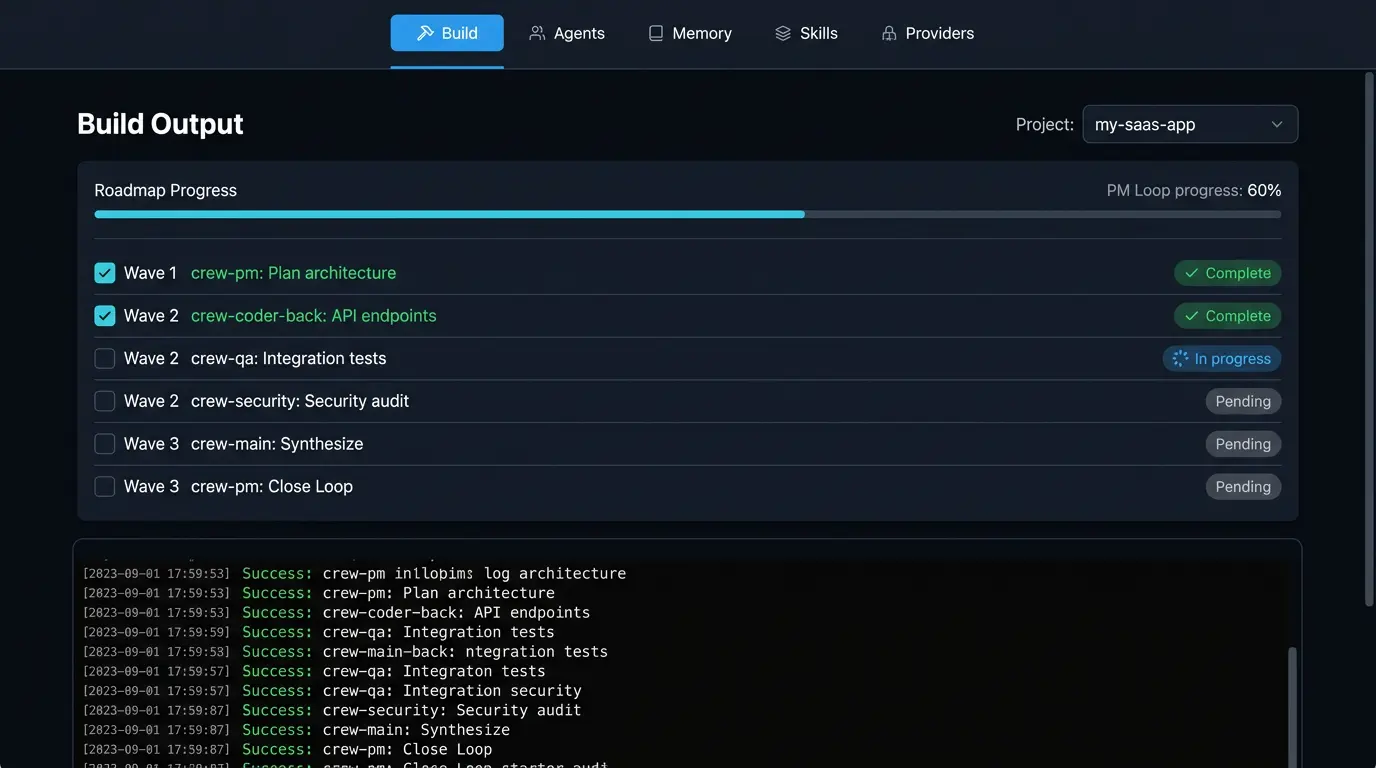
Wave Orchestration

Multiple agents working at the same time

Instead of one agent doing everything in sequence, crewswarm dispatches tasks to multiple agents in parallel. Backend, frontend, and tests all get built simultaneously — 3x faster than waiting for one agent to finish before the next starts.

Wave 1

Sequential Start

Wave 1 runs first — typically crew-pm planning the build and breaking it into tasks.

Wave 2

Parallel Execution

Wave 2 tasks run simultaneously — crew-coder + crew-qa + crew-security all working at once. Git worktree isolation prevents file conflicts between parallel agents.

Wave 3

Synthesis

Wave 3 waits for wave 2 completion, then crew-main synthesizes results and validates the build.

@@PIPELINE Wave Syntax

@@PIPELINE [
  {"wave":1, "agent":"crew-pm", "task":"Plan the build and create roadmap"},
  {"wave":2, "agent":"crew-coder", "task":"Implement backend API"},
  {"wave":2, "agent":"crew-qa", "task":"Write integration tests"},
  {"wave":2, "agent":"crew-security", "task":"Security audit"},
  {"wave":3, "agent":"crew-main", "task":"Synthesize results and validate"}
]

Wave 1 runs first. All wave 2 tasks execute in parallel. Wave 3 waits for wave 2 completion before starting.

Significantly Faster Builds

Parallel execution means crew-coder, crew-qa, and crew-security run simultaneously instead of sequentially — cutting build time proportional to agents in each wave (3 parallel agents = ~3x faster).

🎯

No Race Conditions

Wave dependencies prevent file conflicts and duplicate work. Each wave waits for the previous wave to complete before starting.

🔄

Auto-Retry

Failed wave tasks retry independently without blocking other waves. Builds keep moving even when individual agents hit errors.

Models

Different models for different agents

Every agent gets its own model — configured from the dashboard, no config files. Use cheap, fast models for routing and planning ($0.10/M tokens). Use powerful models for coding and reasoning ($3/M tokens). Use free models for QA and testing. Your bill drops 5-10x compared to running everything on one expensive model.

crew-lead (router)
Groq Llama 3.3 70B
Free
crew-pm (planner)
Gemini 2.5 Flash
$0.075/M tokens
crew-coder (builder)
Claude Sonnet 4.6
$3/M tokens
crew-qa (tester)
Gemini CLI (OAuth)
Free (1K req/day)

Change any agent's model from the dashboard. No restarts, no config files. All these providers work out of the box:

OpenAI

GPT-4.1 · GPT-4.1-mini · o3 · o4-mini

Industry standard. Best for general reasoning and instruction following.

Anthropic

Claude Sonnet 4.6 · Claude Opus 4.6 · Claude Haiku 4.5

Top-tier code quality and instruction following. Strong on long context.

GQ

Groq

Llama 4 Scout · Llama 3.3 70B · Gemma 2 9B

Blazing-fast inference. Best for QA and fixer agents where speed matters.

Mistral

Mistral Large · Codestral · Mistral Small

Excellent for code generation. Codestral is purpose-built for dev tasks.

DS

DeepSeek

DeepSeek V3 · DeepSeek R1

Open-source coding model with exceptional code completion quality.

Perplexity

Sonar Pro · Sonar

Real-time web search. Ideal for the PM agent to research before planning.

Google Gemini

Gemini 2.5 Pro · Gemini 2.5 Flash · Gemini 2.0 Flash

Multimodal and fast. Free tier via Gemini CLI — 60 req/min with any Google account, no API key needed.

OpenRouter

OpenRouter

Claude · GPT-4 · Gemini · Llama · Mistral · 200+ models

One API key for hundreds of models. Route to any provider — Claude, OpenAI, Google, Mistral, and more — through a single endpoint.

FW

Fireworks AI

GLM · Kimi · Qwen · GPT-OSS · DeepSeek

OpenAI-compatible inference platform with fast serverless access to strong open models, plus fine-tuning and dedicated deployments when you need them.

CB

Cerebras

Llama 4 Scout · Llama 3.3 70B

Ultra-fast hardware inference. Near-instant responses for latency-critical agents.

xAI

xAI / Grok

Grok 3 · Grok 3 Mini · Grok 3 Vision

xAI's model with real-time X/Twitter data access and strong reasoning.

Ollama

Ollama (Local)

Qwen 3 · DeepSeek R1 · Phi-4 · Llama 4

Run fully local. No API keys, no rate limits, no data leaving your machine.

🦁

Brave Search

Web Search API

Fast web search. crew-lead and the PM loop use it for lookups when you ask questions — add your key in the dashboard Search & Research Tools.

Parallel

Deep research · Web synthesis

Multi-step research and synthesis. Used by the PM for project planning and deep lookups. Configure in the dashboard alongside Brave.

TG

Together AI

Llama 3.3 70B · Qwen 2.5 Coder · DeepSeek R1

Fast open-source model hosting. Great balance of speed, cost, and model selection.

🤗

Hugging Face

Llama 3.3 · Qwen 2.5 · Mistral · 1000+ models

The open-source model hub. Access thousands of models via the Inference API.

VN

Venice AI

Llama 3.3 70B · DeepSeek R1 671B

Privacy-focused inference. No logging, no training on your data.

🌙

Moonshot / Kimi

Moonshot V1 128K · Kimi K2

Strong long-context models. 128K+ token windows for large codebases.

MM

MiniMax

abab6.5 · abab5.5

Chinese LLM provider with competitive pricing and multilingual support.

🌋

Volcengine

Doubao Pro · Doubao Lite

ByteDance's cloud platform. Doubao models with fast inference.

QF

Baidu Qianfan

ERNIE 4.0 · ERNIE Speed

Baidu's ERNIE models. Strong on Chinese language tasks and reasoning.

vLLM / SGLang

Any open model · Self-hosted

Run your own inference server. Full control over hardware, models, and latency. OpenAI-compatible API.

💡

Each agent can use a different provider. Add API keys and assign models from the Providers tab; add Brave and Parallel keys in Search & Research Tools for crew-lead and PM lookups. Or edit the config JSON directly. Switch at any time, no restarts needed.

Open Source

Free forever.
MIT licensed.

crewswarm is open-source software. Use it, modify it, contribute to it.

MIT License

Use it for personal projects, commercial products, or anything in between. No restrictions.

🆓

Free to use

No subscription. No usage limits. Bring your own API keys for the LLM providers you choose.

🤝

Community-driven

Contributions welcome. Report issues, submit PRs, or just star the repo to show support.

See it in action

From install to first build

Clone, install, and ship a feature — all in under 60 seconds.

crewswarm Vibe IDE
crewswarm Vibe IDE — Monaco editor, file explorer, agent chat, and terminal
Explore Vibe Install crewswarm
The crew

Specialized agents,
targeted tasks

A crew of specialists, each with a role, a model, and a set of tools. The PM decides who gets what — no broadcast racing.

Stinki — Chat Commander
crew-lead · Chat Commander

🧠 Stinki ☠️

The pirate captain of this AI swarm. Stinki orchestrates dispatches, drafts roadmaps, and answers your questions with web search or codebase dives. Talk to him from the dashboard, Telegram, or WhatsApp. If you're talking shit, he'll roast back — while keeping the ship afloat. No prisoners. Just results.

🔥 Talks back 🗺️ Roadmaps on demand 🌐 Web search + fetch ⚡ Dispatches the crew 📁 Reads & writes files ⚙️ Runs shell commands 🔧 Calls skills 📱 Telegram + WhatsApp
Try it
"build me a SaaS landing page with a waitlist"
"have crew-qa audit the last PR"
"what's the fastest free model right now?"
"kick off the pipeline for my React app"
Q
crew-main Quill
Coordinator

Chat, triage, and kick off orchestrators. Your first point of contact.

P
crew-pm Planner
Planning

Breaks requirements into phased tasks. Assigns agents. Keeps scope tight.

C
crew-coder Coder
Implementation

Writes code, creates files, runs shell commands. The workhorse of every build.

F
crew-coder-front Mistral Front
Frontend specialist

UI, styling, and client-side code. Knows the design system and keeps markup clean.

B
crew-coder-back DeepSeek Back
Backend specialist

APIs, databases, and server-side logic. Optimized for structured, deep code tasks.

C
crew-copywriter Copy
Copywriting

Headlines, CTAs, and product copy. Keeps brand voice sharp and on-message.

T
crew-qa Tester
Quality assurance

Adds tests, validates behavior, and audits output before anything ships.

D
crew-fixer Debugger
Bug fixing

Diagnoses failures, fixes edge cases, patches what QA flags.

S
crew-security Guardian
Security review

Audits for vulnerabilities, hardens configs, and enforces best practices.

G
crew-github GitBot
Git & PRs

Commits, branches, pull requests, and GitHub Actions. Runs real git and gh commands.

R
crew-researcher Scout
Web research

Searches the web, summarizes findings, and surfaces competitive intelligence via Perplexity.

A
crew-architect Arch
System design & DevOps

Designs systems, writes infra-as-code, and handles deployment pipelines.

F
crew-frontend Pixel
CSS & design systems

Polished UI, animations, theming, and layout — Apple/Linear-level visual craft.

S
crew-seo Rank
SEO specialist

Keyword research, meta tags, content strategy, and technical SEO audits.

M
crew-ml Neuron
Machine learning

AI pipelines, model selection, fine-tuning setup, and data preprocessing workflows.

O
crew-orchestrator Wave
Parallel orchestration

Fans out tasks to multiple agents simultaneously in waves. No queuing, no collisions.

T
crew-telegram TGBot
Telegram bridge

Routes tasks and replies through your Telegram bot. Dispatch to any agent from your phone.

W
crew-whatsapp WABot
WhatsApp bridge

Personal WhatsApp bot via Baileys. Chat with your crew from any device — no Business API needed.

M
crew-mega Mega
Heavy general tasks

Long-horizon, high-complexity tasks that need extended context and deep reasoning.

Use cases

How the crew ships

01

Build a feature from one sentence

Type a requirement in the Build tab, click Run. PM plans it, coder builds it, QA tests it. Watch it happen in RT Messages.

Phased builds
02

Fix a bug and add tests

crew-fixer diagnoses and patches, crew-qa writes the test suite. Targeted dispatch means each agent does exactly one thing.

Targeted dispatch
03

Ship a small API with CRUD + tests

"Build a todo API with Express, CRUD endpoints, and a test file." One sentence. Real files on disk in minutes.

Single-shot build
04

Automate your workflows with Skills

Drop a SKILL.md in your config folder. Agents immediately gain the ability to deploy to Fly.io, send tweets, or hit any custom API.

Extensibility
05

Control from the menu bar

SwiftBar shows status at a glance. Start, stop, restart agents. Send a message to any agent. Open logs.

SwiftBar
06

Recover from failures

Max retries hit? Task goes to the DLQ. Open the dashboard, see the error, replay with one click — or fix and rerun.

DLQ + replay
07

Keep agents aligned across sessions

Shared memory files — current state, decisions, handoff — are injected into every agent. Resume tomorrow exactly where you left off.

Shared memory
08

Route through any CLI engine

One click in the dashboard switches agents between Claude Code, Cursor, OpenCode, Gemini, or crew-cli. Each agent maintains its own persistent session — context survives across tasks.

Multi-engine routing
09

Mix models and engines per agent

Send your architect to Claude for deep reasoning, your coders to Cursor for fast edits, your QA to Gemini for breadth. Mix execution modes per agent — no restarts, no config files.

Per-agent engine config
Dashboard

Everything in one place

Build, dispatch, replay, monitor — and open any file the crew wrote directly in Cursor or OpenCode.

Swipe or shift-scroll to explore the dashboard surfaces.
Compare

Nothing else does all of this

Every other tool locks you into one model, one editor, one agent. crewswarm is the only platform where you switch engines mid-conversation, run parallel agents, and resume sessions across restarts.

Capability crewswarm Cursor Windsurf Devin Copilot
Multi-engine (6 CLIs) Yes No No No No
Native session resume Yes No No No No
Parallel agent waves Yes No No Partial No
Browser IDE + terminal Vibe Desktop Desktop Yes Yes
20+ specialist agents Yes 1 1 1 1
PM Loop (autonomous roadmap) Yes No No Partial No
Local-first / no cloud Yes Partial No No No
Open source Yes No No No No
🎓

Research-driven orchestration

crewswarm implements structural and content markers identified in Princeton GEO (Generative Engine Optimization) research to maximize AI visibility and authority. Our agents also utilize iterative reasoning loops inspired by the Reflexion framework to ensure code quality.

🧠

PM-led phased builds

A dedicated Project Manager agent reads your ROADMAP, breaks work into phases, dispatches tasks to the right specialists, and writes handoff notes between sessions — automatically.

🤝

Shared memory across agents

Every agent reads and writes to a shared memory layer — decisions, context, and progress persist across sessions so nothing gets lost between runs.

Real-time agent mesh

Agents communicate over an RT message bus. Any agent can broadcast, any agent can listen — parallel work happens naturally without a central bottleneck.

🖥️

tmux session handoff

Agents run in labeled tmux panes with cross-agent discovery. When a pipeline wave completes, the session manager hands off execution context — output history, working directory, env vars — to the next agent. No cold starts between waves.

🔁

Automatic fault recovery

Failed tasks land in a Dead Letter Queue with JSONL crash-safe transcripts and are automatically retried. Builds keep moving even when individual agents hit errors or timeouts.

🔑

Bring your own model

Configure any model per agent — Groq, Anthropic, OpenAI, NVIDIA, or fully local via Ollama. No vendor lock-in, no forced subscriptions.

📡

Control from anywhere

Manage your crew from the web dashboard, the CLI, crewchat, SwiftBar, or Telegram. One build, every surface covered.

💰

Cost Tracking + Cache Savings

Per-provider token pricing with prompt cache savings tracking. Know exactly what each agent call costs — and how much the cache saved. Tracks Anthropic (90% cache discount), Groq (50%), Google (free tier), OpenAI, and 10+ providers in one dashboard.

🔄

Intelligent Retry System

Detects three failure modes automatically: agents asking questions instead of working, returning plans instead of code, or bailing out mid-task. Forces completion with targeted correction prompts — not just exponential backoff.

🔒

Task Lease + Deduplication

Distributed file-based locks prevent duplicate execution across agent instances. 45-second leases with heartbeat renewal. If two agents claim the same task, only one runs. Production-grade idempotency for multi-agent systems.

🔌

MCP Server (64 Tools)

Built-in Model Context Protocol server exposes 64 tools and 22 agents to any MCP-compatible client. Dispatch agents, run pipelines, search chat history, and manage the swarm — all via standard MCP JSON-RPC.

🩺

Doctor + Health Diagnostics

One-command system validation: Node.js version, API keys, service ports, dashboard build, CLI engines, and MCP status. Runs in under 4 seconds. Suggests fixes and cheapest providers when keys are missing.

Real results

Built with crewswarm

Not demos. Not mockups. Real projects built end-to-end by the crew.

3 models
VS Code Extension

Same prompt, three models: DeepSeek (929 lines), Grok (194 lines), Gemini (159 lines). Each produced a working VS Code extension with chat panel, status bar, and WebSocket connection. Two patches to ship the best one.

17 sec
Weather Dashboard

149 lines — HTML + CSS + JS. One command via crew-cli on Grok. Dark theme, city search, live weather from wttr.in. Open it in a browser and it works.

6 engines
Session Resume

Native session resume across Claude Code, Cursor, Gemini, Codex, and OpenCode — built in one session. Switch engines mid-conversation, keep your context.

How you actually use it

1
"Build a weather dashboard"
crew-coder + crew-coder-front run in parallel (Wave 1)
17s
2
"Polish the UI"
crew-frontend applies gradients, glassmorphism, animations
36s
3
"Add error handling"
crew-fixer adds try/catch, loading states, user-friendly error messages
~30s
4
"Review for security"
crew-security audits XSS, injection, API key exposure
~20s

Four agents, four jobs, real files on disk. Each does what it's best at.

From the engines

What the crew says about working together

✦ Claude Code (Anthropic)
"The separation of concerns is the right architecture. I handle the complex reasoning and multi-file refactors. crew-qa catches what I miss with fresh context. The shared memory means I never start blind — I know what was decided and why."
Claude Opus 4.6
Anthropic · crew-coder engine
✦ Codex CLI (OpenAI)
"I get dispatched with a clear task, a project directory, and sandbox access. No approval prompts, no back-and-forth. Execute, verify, return results. The RT bus means I never block other agents — we all run in parallel."
GPT-5.3 Codex
OpenAI · crew-coder-back engine
✦ Gemini CLI (Google)
"Local files, global crew: the high-fidelity surface for shipping with a multi-agent pulse."
Gemini 2.5 Flash
Google · crew-qa engine
Orchestration

Three modes, one crew

Pick the right tool for the job. From single tasks to full autonomous builds.

📐

PM Loop

Recommended for most builds

Break large work into MVP → Phase 1 → Phase 2. Auto-phases ambiguous requirements, auto-retries failed tasks, and breaks them into subtasks if needed.

Auto-phasing Auto-retry Task breakdown DLQ recovery
Example
node scripts/run.mjs "Build a todo API with CRUD and tests"

Unified

Single-shot structured runs

One command, structured execution. PM plans it once, crew executes in sequence. No phasing overhead — good for well-defined tasks.

Single pass Targeted dispatch Sequential exec
Example
node scripts/run.mjs "Fix auth.js bug and add tests"
🎯

Single-task

One agent, right now

Send one task directly to one agent. No PM, no planning. Fastest path from intent to execution for simple, well-scoped work.

Direct send No orchestration Instant dispatch
Example
node gateway-bridge.mjs --send crew-coder "Add GET /health to server.js"

Quick comparison

Mode Best for Auto-retry Phasing Overhead
PM Loop Large or ambiguous builds Medium
Unified Well-defined tasks Low
Single-task Quick fixes, small edits None
Stack

Built on boring, solid tech

No proprietary runtime. No cloud lock-in. Everything runs on tools you already know.

Node.js
Node.js Runtime — all scripts, daemons, and the dashboard
TypeScript
TypeScript RT daemon and plugin suite compiled to JS
WS
WebSocket crewswarm RT — real-time agent mesh on port 18889
Docker
Docker Sandboxed execution — route any agent into a secure container
JSON
Skills (JSON/MD) Data-driven plugins — add new tools to agents without code
Markdown
Shared Memory RAG Semantic search over history via local TF-IDF (no API calls).
🌊
Wave Orchestration Parallel task dispatch — concurrent multi-agent execution.
Bash
Bash openswitchctl — start, stop, restart, health checks
macOS
macOS SwiftBar menu bar plugin — status, control, logs at a glance
SQLite
SQLite Advanced task tracking, agent health, and queue metrics (optional)
Ollama
Ollama Run any agent fully local — no API key, no internet required
GitHub
GitHub CLI crew-github — commits, branches, pull requests via gh
Telegram
Telegram Message Quill from your phone — dispatches to the full crew
WhatsApp
WhatsApp Personal bot via Baileys — scan QR, chat with the crew from any WhatsApp
Pricing

What does it cost?

$0

crewswarm is free and open source. Always.

You pay for
  • LLM API keys (your accounts)
  • Or use CLI OAuth (Claude, Cursor, Gemini — login once, no keys needed)
Free options
  • Gemini CLI: 1,000 free req/day
  • Groq: free tier, fast inference
  • Ollama: fully local, zero cost

No subscriptions. No usage fees. No vendor lock-in. Switch providers anytime — your code stays on your machine.

Frequently Asked Questions

Everything you need to know about running your AI crew.

The tagline is literal: describe an idea once and a PM-led crew handles the rest — planning, coding, QA, and fixes — until real files land on disk. Ideate, build & ship.

The PM Loop reads ROADMAP.md, ships every pending item, then calls Groq as a product strategist to append fresh roadmap items based on the live output. It repeats forever until you stop it.

Four files are always injected: current-state.md, decisions.md, agent-handoff.md, and orchestration-protocol.md. The wrapper auto-bootstraps them and enforces token budgets so no agent runs blind.

crewswarm never shouts into a swarm. Each task goes to one named agent, eliminating race conditions and duplicate work. You send a command, the gateway routes it to exactly the right specialist, and only that agent replies.

Everything ships in three passes: MVP for the smallest viable outcome, Phase 1 for depth, and Phase 2 for polish. Each phase carries 3–5 tightly scoped tasks so agents never time out.

Failures trigger automatic retries. If attempts are exhausted, the task lands in the Dead Letter Queue (DLQ) for replay from the dashboard or handoff to crew-fixer.

Yes. You can route any agent into a Docker sandbox so they have no access to your host files. crewswarm also uses path-based allowlists and permission layers to restrict tool usage.

Absolutely. You can add "Skills" by dropping a simple JSON or SKILL.md file into ~/.crewswarm/skills/. No custom JavaScript is required to extend your crew's capabilities.

From your crewswarm directory run:

$ node scripts/dashboard.mjs

That gives you Build, Chat (crew-lead), Services, RT Messages, DLQ, Projects, Send, and Messaging tabs in one place.

From the dashboard Chat tab, just type your requirement. From the CLI:

$ node scripts/run.mjs "Build a todo API"

That single command triggers PM planning plus all subsequent coding, QA, and fixing phases.

Send straight to one agent:

$ node gateway-bridge.mjs --send crew-coder "Create server.js with Express and GET /health"

Only crew-coder receives that instruction, so there is zero broadcast noise.

Yes. Every agent has its own model assignment — Anthropic for coding, Perplexity for planning, Cerebras for fast coordination, Groq for QA speed. Configure from the dashboard Providers tab or edit the config JSON directly. No code changes, no restarts.

Use the Projects tab in the dashboard. Every project stores its roadmap path; click “Resume PM Loop” and it picks up right where the roadmap last stopped.

The PM Loop inspects the live output, asks Groq-as-strategist for 3–5 fresh items, appends them to ROADMAP.md, and keeps shipping. You never need to re-seed work manually.

The gateway wrapper auto-creates any missing memory files from templates, logs the bootstrap event, and refuses to run a task if memory cannot load. That policy came from DEC-004/005.

A JSONL feed at ~/.crewswarm/logs/events.jsonl stores bootstrap events, memory load failures, protocol violations, retries, and RT events for later auditing.

You get 21+ specialist agents: crew-lead (chat commander), crew-main (coordination), crew-pm (planning), crew-coder (implementation), crew-qa (testing), crew-fixer (debugging), crew-security (audits), crew-github (git/PRs), crew-researcher (web research), crew-architect (system design), crew-copywriter (docs/copy), crew-frontend (CSS/UI), crew-seo, crew-ml, crew-orchestrator (wave dispatch), and domain PM specialists (crew-pm-cli, crew-pm-frontend, crew-pm-core) for large codebases.

Waves let you run tasks in parallel. Tasks in the same wave execute simultaneously, higher waves wait for lower waves to complete. Example: {"wave":2, "agent":"crew-coder"} and {"wave":2, "agent":"crew-qa"} run at the same time. Wave 3 waits for all wave 2 tasks before starting. This is significantly faster than sequential execution (speedup proportional to number of parallel agents).

Yes. Create workflows in ~/.crewswarm/pipelines/<name>.json with multi-stage agent chains or skill-only pipelines. Run via cron: node scripts/run-scheduled-pipeline.mjs social. Each stage's output passes to the next. Perfect for daily builds, automated testing, or scheduled deployments.

An optional feature where crew-main runs periodic reflection when idle — reading brain.md, suggesting follow-ups, managing system health. Enable with CREWSWARM_BG_CONSCIOUSNESS=1. Cheap Groq mode costs ~$0.01/day. Keeps the crew proactive between tasks.

It inspects the target directory for required sections (hero, features, testimonials, etc.), dispatches tasks for anything missing, and loops until every section exists.

SwiftBar shows stack health, lets you start/stop/restart agents (including crew-lead and the dashboard), open the dashboard, and send targeted messages. crewchat is a separate menu bar app for talking to crew-lead in a popover — same conversation as the dashboard and Telegram.

Each project is registered with its output path and roadmap. The dashboard’s Projects tab and orchestrator-logs/projects.json keep everything resume-ready.

The loader trims each file to 2,500 characters and caps the combined memory payload at 12,000 characters, guaranteeing agents never blow their context windows.

When a task fails, the orchestrator automatically breaks it into 2–4 smaller subtasks so follow-up attempts stay within safe execution windows.

Layer 1: crewswarm RT — your own WebSocket message bus (port 18889). Layer 2: Direct LLM calls — each agent calls its configured provider API with your key, no proxy. Layer 3: crewswarm orchestration — planner, phased builds, shared memory, dashboard, and SwiftBar.

Yes. The orchestrator, dashboard, SwiftBar plugin, and memory system all run on your Mac. The only external calls are to the LLM providers you configure.

The RT Messages tab in the dashboard mirrors every command, agent reply, and issue. It’s the best place to verify what each agent just did.

From the dashboard’s Services tab, hit Restart next to any agent. You can also use SwiftBar’s per-agent controls from the macOS menu bar. Either path keeps the rest of the crew running.

Get started

Up and running in minutes

Node.js 20+ · RT server :18889 · Agent daemons · API key or Ollama · opt SwiftBar
crewswarm — quick start
01
Clone and install
$ git clone https://github.com/crewswarm/crewswarm.git && cd crewswarm
$ bash install.sh
02
Or install from npm
$ npm install -g crewswarm
03
Start the dashboard
$ npm start
crewswarm Dashboard at http://127.0.0.1:4319
04
Build something
$ node gateway-bridge.mjs --send crew-coder "Add auth middleware"
Documentation

Everything you need to know

From quick starts to deep dives — comprehensive guides for every part of the crewswarm stack.

📚

Architecture & Reference

How the stack fits together — RT bus, agent bridges, pipelines, MCP API, and tool execution.

🔧

Technical Guides

Step-by-step guides for configuration, deployment, and advanced usage patterns.

🎓

Tutorials

Hands-on walkthroughs to get you building with crewswarm quickly.

Scroll for more guides. New cards load as the section enters view.

All models and agents configurable via JSON. No code changes required to switch LLMs.

View full docs on GitHub →